
Approaches to alimony vary widely from state to state.
Some states, including Florida, New York, and Pennsylvania, have formulas that dictate the amount and duration of alimony.
Other states, such as California, have suggested temporary alimony formulas that vary from county to county.
Still, other states have informal protocols that ask the parties to attempt to equalize incomes after taxes but before expenses.
Most states do not have alimony formulas. Those states leave it to the parties to negotiate or the judge to decide, using a set of weighting factors. Typical factors include duration of the marriage, relative incomes, health of the parties, and other factors that reasonably might influence a reasonable alimony award.
All of these approaches have aspects to commend them. Generally speaking, the various approaches balance certainty (with formulas) against the ability to be fair in each case (the pure negotiation approach).
Against this backdrop of various approaches, Family Law Software has developed an approach that we feel blends the best of both worlds.
There is a formula, based on a difference-of-incomes approach that is common in formula-driven states. But the Family Law Software method also allows for the resulting amount to vary based on subjective factors.
Our team of experienced tax experts, family law attorneys, and software developers conducted extensive research into each state’s laws and customary practices as well as law journal articles on the subject. Additionally, our unique experience with spousal support approaches across the country allowed us to identify common factors across many jurisdictions.
With the FLS Alimony Formula, professionals can navigate the complexities of common state specific factors while benefiting from a reliable framework informed by our research and network.
This tool is now available to all users of Family Law Software.
It enables the user to adopt a sophisticated and flexible yet straightforward approach to one of family law’s most common challenges.
Family Law Software Alimony Formula
The core of the calculator is the formula for the amount.
The FLS formula amount gives the alimony recipient a share of the income differential between the parties. The greater the difference in incomes between the parties, the higher alimony will be.
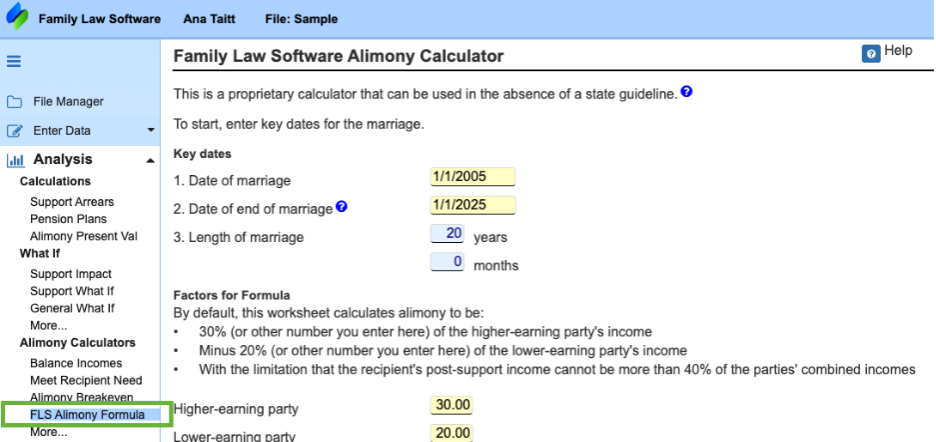
By default, the formula determines alimony as:
30% of the higher earning party’s net income
Minus 20% of the lower earning party’s net income
With a maximum cap: the recipient’s post support income cannot exceed 40% of the parties’ combined incomes.
If your state’s customs or case law requires an adjustment to the suggested 30%, 20% or 40% levels, you can just modify the percentages as desired.
One way in which the Family Law Software alimony calculator is perhaps superior to most state-specific calculators is that the FLS calculator measures income on an after-tax basis. This is because Family Law Software is doing a detailed federal income tax calculation and state tax estimate, which is beyond what most states felt they could require.
After-tax income is the parties’ real income, so it makes sense to use that if possible, and the Family Law Software calculator makes it possible.
Adjustments for Qualitative Factors
Most state alimony statutes call for alimony to be based in part in qualitative factors. Qualitative factors commonly mentioned in state statutes include the following:
- Party’s age
- Party’s health
- Party’s income and employability
- Party’s lifestyle
- Party’s property
- Party’s caregiving responsibilities
- Party’s contribution to the marriage
- Party’s need for education or training
No state’s alimony formula has the ability to adjust for qualitative factors such as these.
The FLS Alimony calculator can adjust for any or all of them.
To see how, consider this example:
If the user believes that a party’s caregiving responsibilities for the family justifies an increase in spousal support, selecting this factor, by clicking “Increase” boxes, adds 0.1% to the default 30% multiplier, resulting in a higher alimony amount. If that factor is very important, the user can click “Increase” again to add another 0.1% to the multiplier. The calculator allows up to 5 ticks in each direction. So, users can increase or decrease the payer’s obligation in response to the weight of these qualitative factors.
So, for example, if the payor’s health negatively impacts their ability to pay spousal support, selecting “reduce” box factors subtracts from the multiplier, reducing the final proposed alimony award.
This flexibility ensures the calculation aligns with the unique circumstances of each case.
Determining the Duration of Spousal Support
The FLS alimony calculator will calculate not only the amount of alimony, but also the duration (how long it should be paid).
In the FLS Alimony Formula we apply a “Duration Factor” to the length of marriage:
0–3 years: Factor of 0.3
3–10 years: Factor of 0.5
10–20 years: Factor of 0.75
20+ years: Factor of 1.0
For instance, a 9-year marriage would result in a recommended alimony duration of 9 * 0.5 = 4.5 years.
A long-term marriage of 25 years would result in a recommended alimony duration of 25 * 1.0 = 25 years.
By combining a predictable formula with the flexibility to account for unique family circumstances, it empowers users to achieve fair and collaborative alimony agreements.
We hope you enjoy using this new tool. Find it in the Cloud software at the location illustrated below:
Helpful Resources:
Free Trial of Family Law Software Alimony Calculator: https://site.familylawsoftware.com/cloudtrial/
Family Law Software Blog “Understanding Alimony”: https://www.familylawsoftware.com/understanding-alimony/