
To calculate child support arrears, click Analysis > Support Arrears.
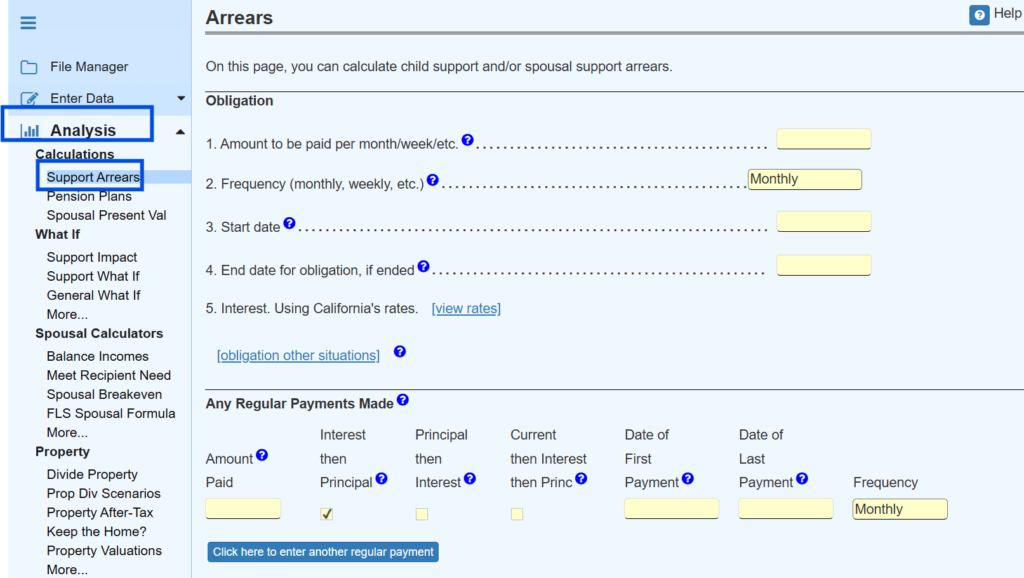
There are some special cases that can arise. Here is how you handle them:
- Two or more obligations. In the obligation section at the top, click the link labeled “[obligation other situations].”
- Interest rates. We are keeping track of interest rates for each time period for several states and we are applying those rates automatically. In the obligation section on the line for interest rates (line 5 in the image above), if you see text saying “Using [your state]’s rates,” then we are tracking the rates for your state. If you want to use rates other than those for your state, click the link in the top section labeled “[view rates].”
In general, just go from top to bottom reading the help texts carefully.
Because the calculation can be very extensive, we do not update with every keystroke. Please click the button at the bottom of the screen to update the calculation.
At the bottom of the screen, click all of the links to see the detailed reporting of the arrears calculation.