
There are three questions we are often asked about the carrying of debts to the financial affidavit:
- How do I get debts to appear on only one party’s affidavit?
- How do I get the amount being paid currently on the debt to flow to the correct person’s affidavit?
- What are the two footnote buttons for the debt?
This FAQ will address each of these in turn.
1. How do I get debts to appear on only one party’s affidavit?
On the screen where you enter the debt, you will in most states see a drop-down labeled “Affdvt” or “Affid,” or other abbreviation of “Affidavit,” as shown below:

This drop-down will show the initials of both parties and “JT” for “joint” or “Both” for “both,” as shown below.
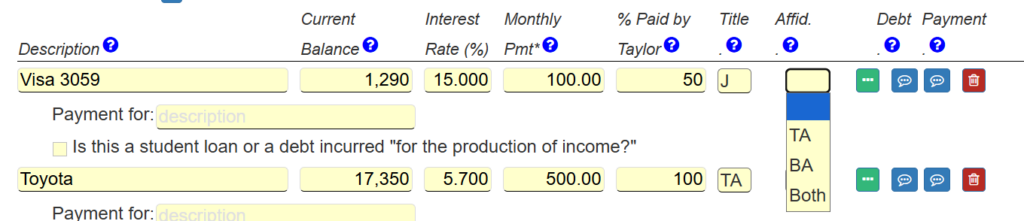
By default, all assets and debts flow to both parties’ affidavits.
However, if you wish to restrict an asset or a debt to flow only to one party, then select that party’s initials in this Affidavit drop-down.
If you do not see the Affidavit drop-down, then click the “more info” button (green three dots button), and on the line for whose affidavit the debt should carry to, select the party you wish.
To make the “Affidavit” drop down appear on the Debts line at the top level, specify in the checkbox at the very top of the screen that you want to enter information for the financial affidavit, as shown below.

2. How do I get the amount being paid currently on the debt to flow to the correct person’s affidavit?
On the line where you enter the debt, you will see an entry for the percent of the debt payment to be made by the first party.

If that is blank, then the entire debt payment will flow to the first party.
Enter the percent of the debt that you want to be paid by the party shown. The remaining percentage will be paid by the other party.
So, for example, to specify that the entire payment will be made by the other party, enter zero for that entry.
This affects not only the affidavit, but also the Budget Report and cash flow projections.
3. What are the two footnote buttons for the debt?
On the debt you will see two footnote buttons, as shown below.

The first one will appear associated with the debt in the assets and debts section of the affidavit. This one will also appear as a footnote on the property division reports.
The second footnote relates to the debt payment. That footnote will appear with the debt payment on the affidavit. It will also appear with the debt payment on the Budget report.