
New York Law provides that, for combined incomes over a certain level, child support does not increase any further.
That income threshold is known colloquially as the “cap.”
By statute, the cap is increased every other year for inflation.
This note discusses what to do in various situations where you do not want the cap to apply.
Using a Higher Cap
If you want to use a cap, but one that is higher than the cap that is the statutorily provided, you can do that in Family Law Software.
Here are the steps:
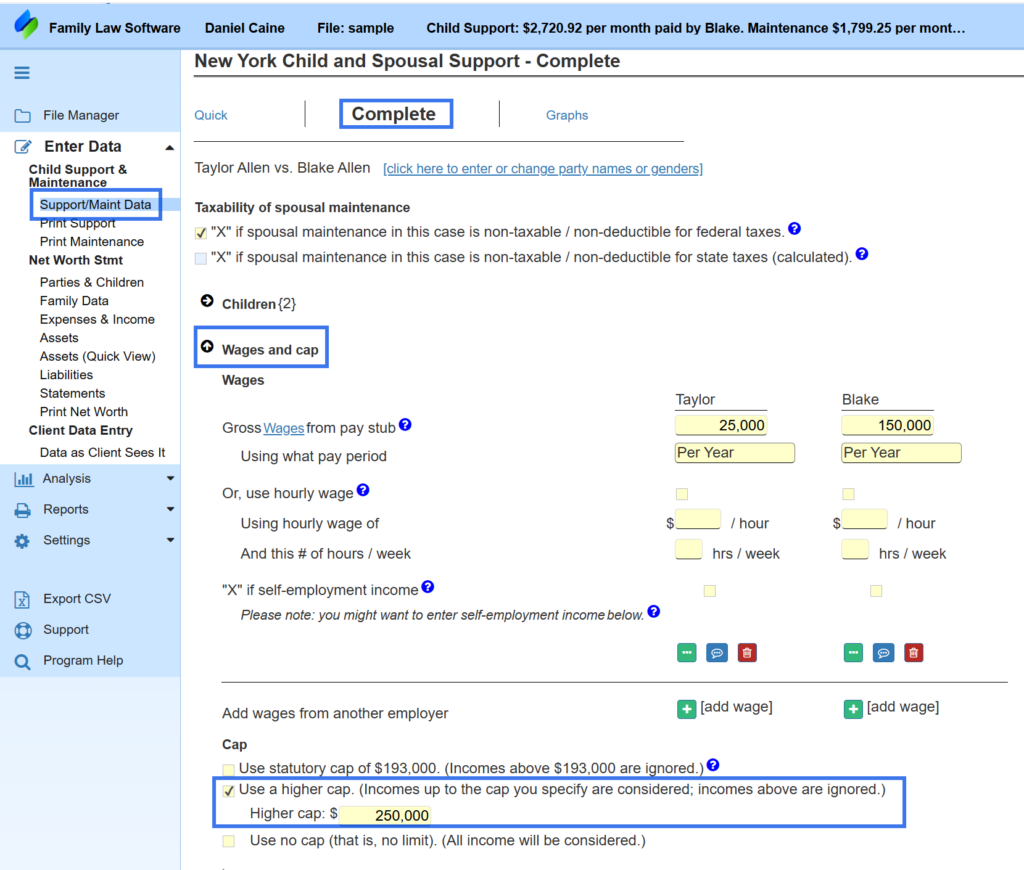
- Go to the screen for Support/Maint Data.
- At the top, click Complete.
- Click the section for Wages and Cap.
- Check the box to use a higher cap and enter the cap you want.
This is illustrated below.
Using all income (No cap)
Sometimes you may want to calculate child support as if no cap applies.
In that case, you would follow steps 1-3 shown above, and then click the checkbox to “Use no cap,” as shown below.

Using an Older Cap
This is very unusual, but occasionally you may want to use an older and lower cap.
There is no checkbox for this.
One approach would be to enter the parties’ incomes in such a way that they add up to the old cap (“OldCap”) and retain their proportions.
- Make a copy of the case. (File Manager > 3-dots > Make a copy)
- Write down ActualWageA and ActualWageB
- NewWageB = OldCap / ((ActualWageA / ActualWageB) + 1);
- NewWageA is OldCap – NewWageB.
Put NewWageA and NewWageB as the wages, and you will get the support result you are looking for.
How did we get that formula?
We are trying to find NewWageA and NewWageB that add up to the old cap and have the same relative sizes they do now.
Here’s how we got that.
We know that…
Wages add up to the old cap:
NewWageA + NewWageB = OldCap
The ratio of wages is the same as actual:
NewWageA / NewWageB = ActualWageA / ActualWageB
ActualWageA / ActualWageB is a number that we can compute. Let’s call it “Ratio”
So now:
NewWageA / NewWageB = Ratio
NewWageA = NewWageB * Ratio.
Now back to our top equation:
NewWageA + NewWageB = OldCap
And substituting “NewWageB * Ratio” in place of NewWageA:
(NewWageB * Ratio) + NewWageB = OldCap
NewWageB * (Ratio + 1) = OldCap
NewWageB = OldCap / (Ratio + 1);
We know OldCap and Ratio, so we can now determine NewWageB.
NewWageA is OldCap – NewWageB.
Now we have the wages to plug in on our new worksheet.
This assumes that wages are the only income. If not, the same thing can work with total income, but the parties should just substitute total income for wages throughout.
In the copied file that they are using, they should delete all the other incomes and just enter the calculated amounts as wage incomes, again, using total incomes to calculate the wage amounts to enter.