
As you may know, Family Law Software is phasing out the desktop software on September 30, 2026.
This FAQ will answer questions that Cloud Individual Edition users may have about their next steps.
Confirming Your Edition
If you are not sure what edition you have, you can find out by clicking here, filling in the account information, and clicking Submit Request. (No charge at that moment.)
You can find the person whose name is on the account, and their User Id, by looking at the very bottom of the Cloud screen, as shown below…

… or at the top of the Open / Save screen in the desktop software, as shown below.
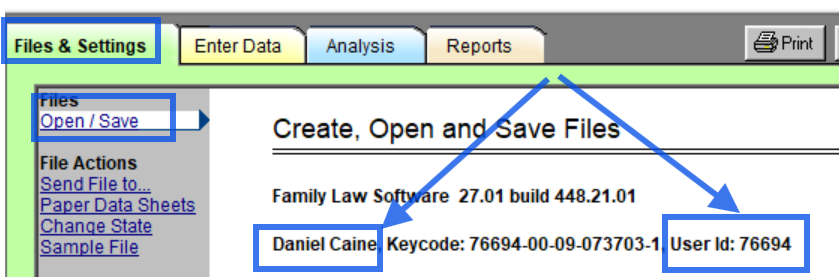
Confirming the Edition You are Using
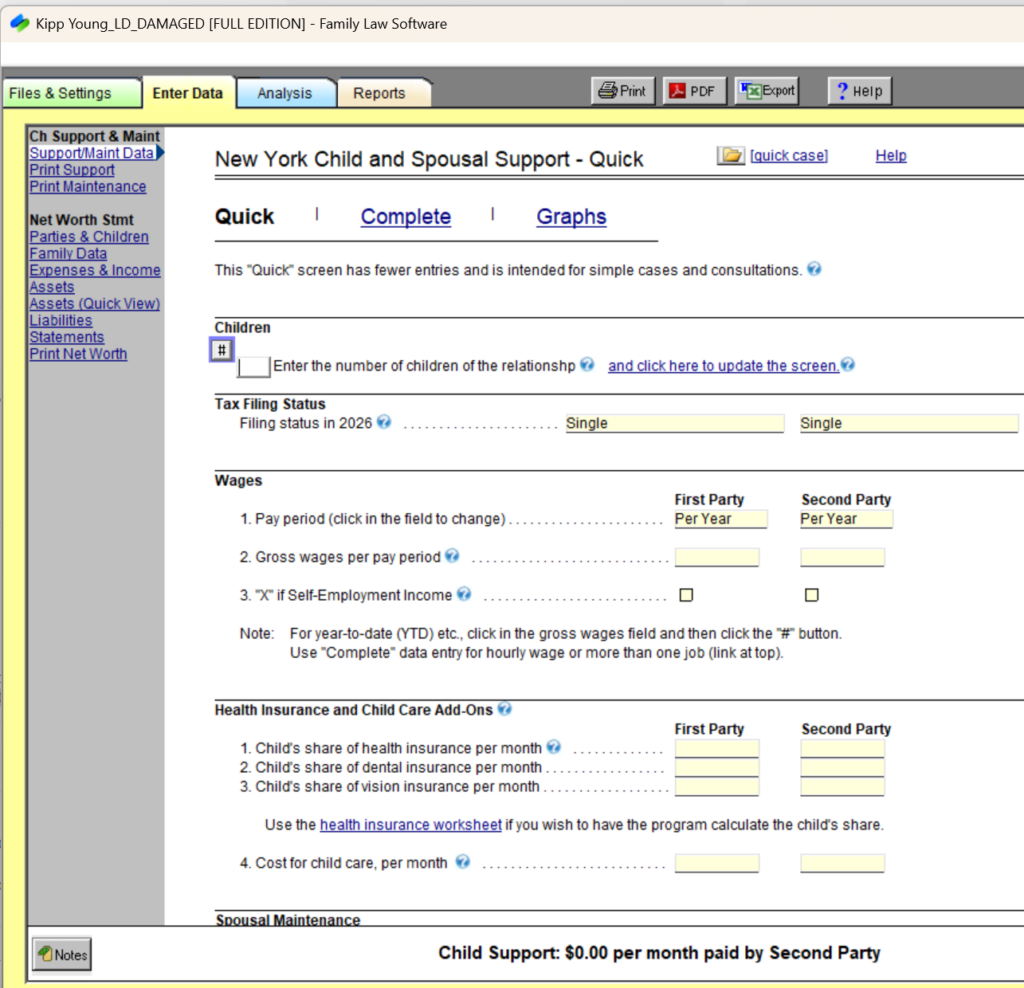
Cloud Edition subscribers may use either Cloud or desktop, so you may not know which edition you are using. To determine which edition you are using, look at the screen images below.
This is the desktop:
This is the Cloud:
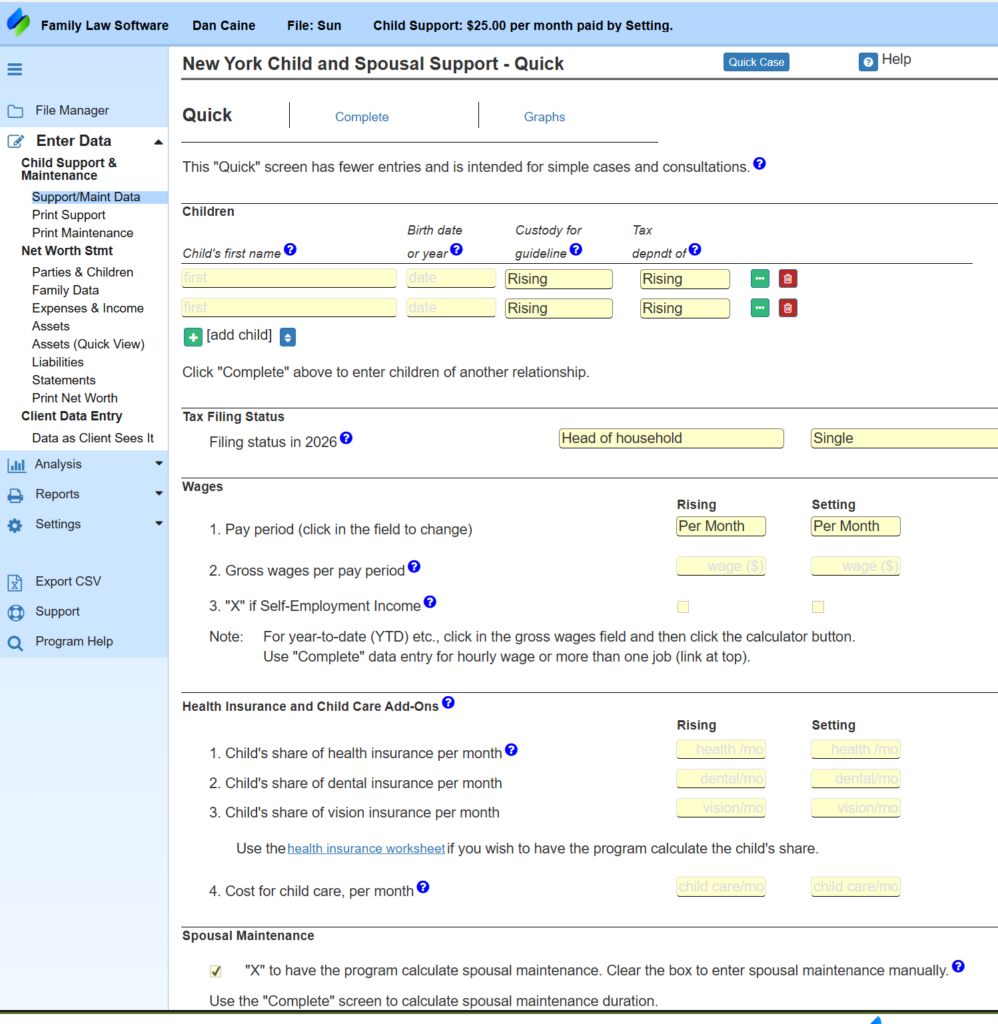
Looking at these images will tell you which you are using.
If you are using the desktop, you will need to transition to the Cloud.
If other people in your office are using the desktop, they will need to transition to the Cloud.
Logging In to Cloud
If you have the Cloud Individual Edition, the person whose name is on the account may already log in to the Cloud.
If the person whose name is on the account is not currently logging in to the Cloud, all they have to do is to go to pro.flsgo.com and click “Forgot your password?”
That will allow them to reset their password. Then they can go to pro.flsgo.com and log in any time.
Transitioning to Cloud
If you are currently using the desktop software, then you will want to transition to using the Cloud.
Click here for help transitioning to using the Cloud.
Considering Cloud Firm
The Cloud Individual Edition licenses only one subscriber.
If there are more people in the firm who would like to access the software, you may wish to consider upgrading to the Cloud Firm edition.
The Cloud Firm edition includes the following benefits.
- Add all additional non-professional Staff, each with their own logins, at no additional cost.
- Enable Professionals and Staff to view and edit each other’s files.
- Enable opening of files of Professionals who have left the firm.
The Cloud Firm edition costs $10 more per Professional per month than the Cloud Individual Edition. For new users, there is a one-time $99 set-up fee.
Paralegals and non-financial Staff of financial advisors are free.
To upgrade to the Cloud Firm Edition:
- Click here.
- Enter the name, state, and User Id as shown above.
- Click Submit Request.
- Select Cloud Firm and continue.
As an alternative, you can have multiple Cloud Individual subscribers on the same account, but they will not be able to see each of these files and you will not be able to add staff.
If there is only one person in the firm, then stay with your Cloud Individual Edition. If more than one person wants to work in the software, however, then we really recommend Cloud Firm.
Add Additional Members
If you upgrade to Cloud Firm, you can add additional members through the Account Manager as follows:
- Log in to Family Law Software.
- In the upper right hand corner, click the Account button.
- Click the tile to Add/Remove Employees.
- Click the “+” button for each employee you wish to add.
Additional Professionals will add $10 per month per Professional to your charge (after one-time $99 set-up fee). Additional non-professional Staff, such as paralegals, are free.
Add a System Administrator
When you add an employee, specify that they are a system administrator.
The person will then be able to log in themselves and add and remove employees.
If they do not get a registration email, they should do the following:
- Go to pro.flsgo.com.
- Click “Forgot your password?”
- Register.
- Go to pro.flsgo.com again.
They will be taken to the Account Manager.
Questions?
Click here for general questions about phasing out of the desktop software.